Using Payments API
Implementing the Payment Intent Flow with Accrue Pay
Introduction
This guide provides a comprehensive overview of the Payment Intent flow within Accrue Pay's Merchant API. Payment Intents represent a customer’s intent to make a payment and are used to track and manage a payment’s lifecycle from creation to settlement.
What is a Payment Intent?
A Payment Intent is a key object that:
- Captures the customer’s selected payment method (Accrue Wallet or Bank Account)
- Represents their choices at checkout
- Manages payment authorization, capture, and settlement
- Tracks the state of a payment across its entire lifecycle
End-to-End Integration Flow
The following diagram outlines the full integration journey across Customer, Merchant Frontend, Merchant Backend, and Accrue Pay:
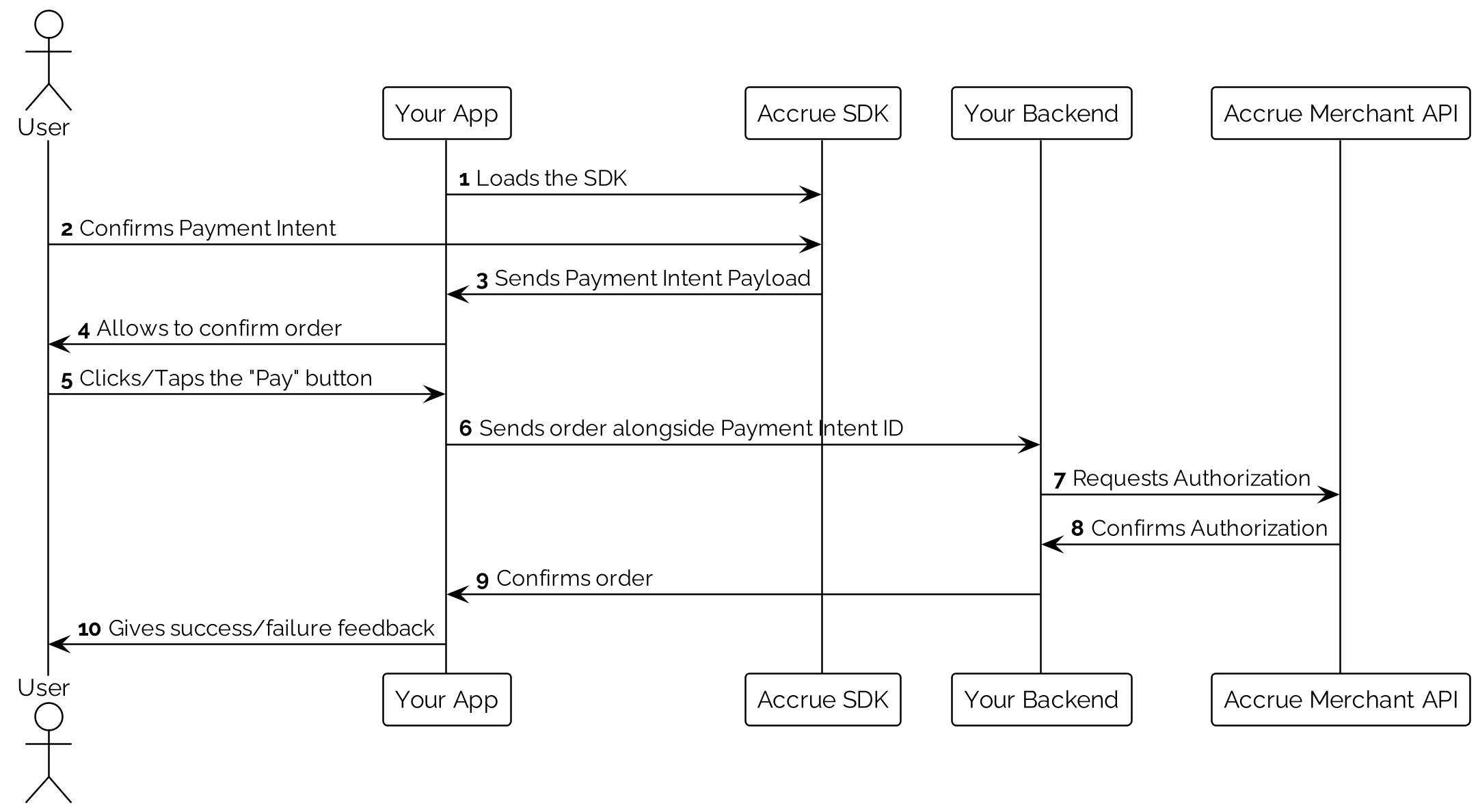
Flow Overview
-
Customer Interaction (Merchant Frontend)
- Customer selects Accrue Pay at checkout
- Completes checkout flow with either Wallet or Bank Account
- Completes any necessary authentication
- A Payment Intent is created via the frontend SDK
-
Frontend to Backend Handoff
- The frontend sends the Payment Intent ID to your backend
- The backend prepares to authorize the intent
-
Backend Processing
- Authorizes the Payment Intent, converting it into a Payment
- Captures the authorized payment
- Confirms success and updates the order status
-
Finalization
- Merchant fulfills the order
- Accrue Pay settles funds based on the agreed schedule
Detailed Payment Intent Flow
1. Creating a Payment Intent
A Payment Intent is initiated when the customer selects Accrue Pay and a payment method. The frontend SDK handles:
- Presenting payment method options
- Authenticating the user
- Initiating the Payment Intent object with the selected method
2. Authorizing a Payment Intent
Once the Payment Intent is created, your backend must authorize it. Authorization reserves the funds and converts the intent into a Payment.
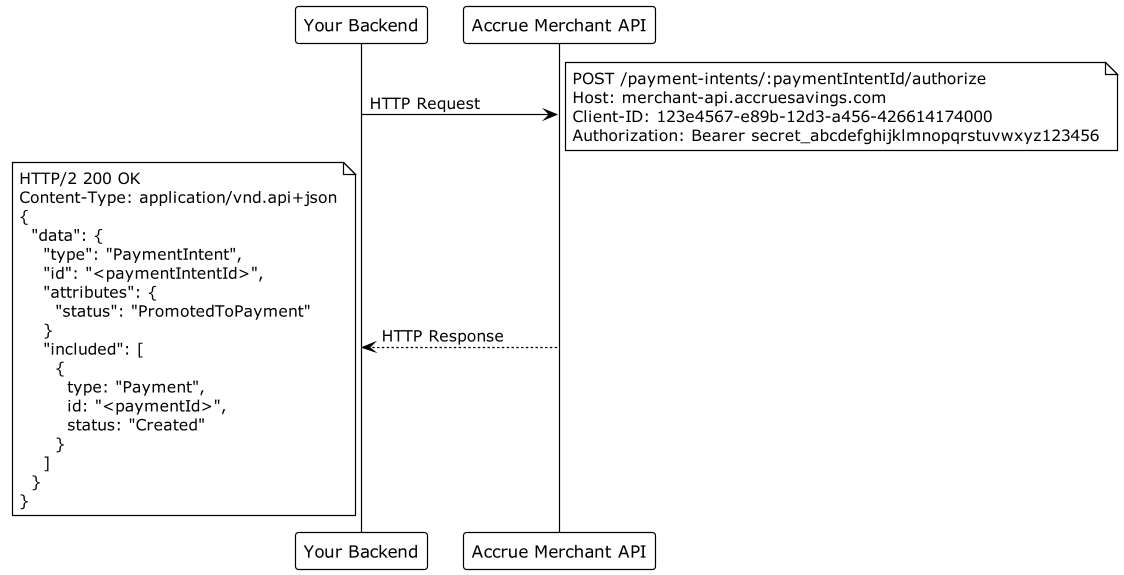
API Endpoint: POST /api/v1/payment-intents/:paymentIntentId/authorize
Headers: Client-ID, Authorization: Bearer <client-secret>, Content-Type: application/vnd.api+json
Request:
{
  "data": {
    "type": "AuthorizePaymentIntent",
    "attributes": {
      "amount": 10000,
      "idempotencyKey": "order-12345-authorize",
      "reference": "order-12345",
      "channel": "ORG-1",
      "risk": {
        "deviceSessionId": "device-session-abc123"
      }
    }
  }
}
reference, channel, and risk are optional. Send idempotencyKey on every authorize — it is optional for backwards compatibility and is expected to become required. When card processing is enabled for your integration, Accrue provides the optional meta.processor request shape separately during onboarding — do not infer it from public docs.
Response:
The response returns the Payment Intent in data and the created Payment in included. When a wallet is attached, balance information may appear on the payment intent attributes.
{
  "data": {
    "id": "497f6eca-6276-4993-bfeb-53cbbbba6f08",
    "type": "PaymentIntent",
    "attributes": {
      "amount": 10000,
      "status": "PromotedToPayment",
      "reference": "order-12345",
      "userId": "123e4567-e89b-12d3-a456-426614174000",
      "walletId": "223e4567-e89b-12d3-a456-426614174001"
    },
    "relationships": {
      "payments": {
        "data": [
          {
            "id": "323e4567-e89b-12d3-a456-426614174002",
            "type": "Payment"
          }
        ]
      }
    }
  },
  "included": [
    {
      "id": "323e4567-e89b-12d3-a456-426614174002",
      "type": "Payment",
      "attributes": {
        "amount": 10000,
        "status": "Created",
        "reference": "order-12345",
        "expiresAt": "2025-05-19T14:22:33.000Z"
      }
    }
  ]
}
Behavior notes:
- If the payment intent was already authorized, the existing active payment is returned without re-authorizing.
- Reuse the same
idempotencyKeyfor every retry of one logical authorize, including after a timeout or a lost response. A matching retry replays the original success response instead of authorizing again. Rotating the key on an ambiguous failure can authorize twice. - A request that arrives while the first attempt is still in flight returns
409. Retry the same request (same key and attributes) until you receive a success or a definitive402decline. Do not create a new payment intent to recover from a timeout. - Reusing a key with different attributes (
amount,reference,channel,risk.deviceSessionId, ormeta.processor) returns409(IdempotencyKeyReused) and is not replayed. Use a new key only for a deliberately new authorization. - When a card processor is configured, processor authorization runs inline and can take several seconds. Use a client timeout of at least 60 seconds (90 seconds recommended for authorize). A declined processor authorization returns
402and marks the paymentFailed. Concurrent retries of an in-flight processor authorize still return409(and do not charge twice) even if you omitidempotencyKey. - Card-processor responses may attach opaque processor data on
included[].meta.processor.
3a. Capturing a Payment (Bank Rails)
Authorized payments must be captured to initiate fund transfers. Capture can be automatic or manual, depending on your configuration.
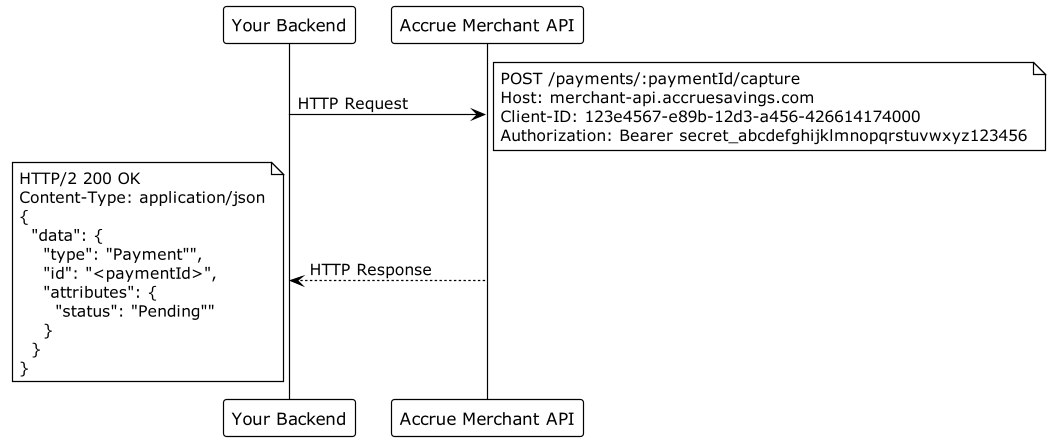
API Endpoint: POST /api/v1/payments/:paymentId/capture
Request:
{
  "data": {
    "type": "CapturePayment",
    "attributes": {
      "amount": 10000
    }
  }
}
Response:
{
  "data": {
    "id": "323e4567-e89b-12d3-a456-426614174002",
    "type": "Payment",
    "attributes": {
      "amount": 10000,
      "status": "Processing",
      "reference": "order-12345"
    },
    "relationships": {
      "paymentIntent": {
        "data": {
          "id": "497f6eca-6276-4993-bfeb-53cbbbba6f08",
          "type": "PaymentIntent"
        }
      }
    }
  },
  "included": [
    {
      "id": "497f6eca-6276-4993-bfeb-53cbbbba6f08",
      "type": "PaymentIntent",
      "attributes": {
        "amount": 10000,
        "status": "PromotedToPayment"
      }
    }
  ]
}
3b. Capturing a Payment (Card Rails - Using Virtual Debit card)
When using the card rails integration option, Accrue Pay provides a virtual debit card that you can process through your existing payment gateway.
After authorizing the Payment Intent, follow these steps to capture the payment using the virtual debit card:
Step 1: Retrieve the virtual debit card details using the secure API
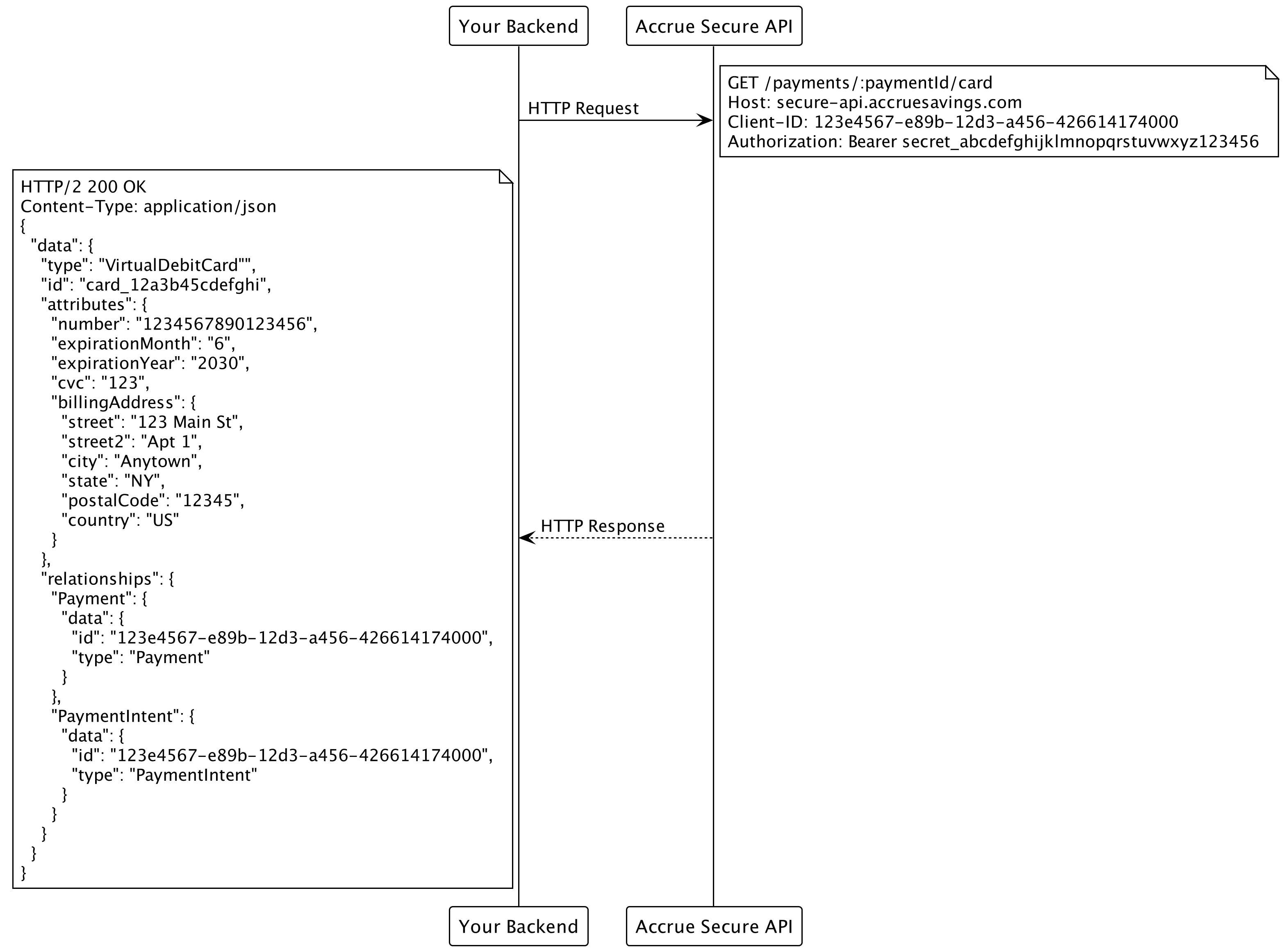
API Endpoint: GET https://secure-api.accruesavings.com/api/v1/payments/:paymentId/card
Headers:
Client-ID: your_client_id
Authorization: Bearer your_client_secret
Content-Type: application/vnd.api+json
Response:
{
  "data": {
    "id": "497f6eca-6276-4993-bfeb-53cbbbba6f08",
    "type": "VirtualDebitCard",
    "attributes": {
      "number": "5555555555554444",
      "expirationMonth": "6",
      "expirationYear": "2028",
      "cvc": "123",
      "billingAddress": {
        "street": "123 Main St.",
        "street2": "Apt. 1",
        "city": "San Francisco",
        "state": "CA",
        "postalCode": "94107",
        "country": "US"
      }
    },
  }
}
Step 2: Process the virtual debit card through your payment gateway
Use your existing payment gateway to process the virtual debit card details:
- Submit the card details (number, expirationMonth, expirationYear, cvc) to your payment gateway
- Use the same amount that was authorized in the Payment Intent
- Store both the Accrue Pay payment ID and your gateway's transaction ID for reconciliation
Example integration with a payment gateway:
// Example code - implement according to your payment gateway's API
const processMastercard = async (cardDetails, amount) => {
  const response = await paymentGateway.processCard({
    card_number: cardDetails.attributes.number,
    expiry_month: cardDetails.attributes.expirationMonth,
    expiry_year: cardDetails.attributes.expirationYear,
    cvv: cardDetails.attributes.cvc,
    billing_address: {
      street: cardDetails.attributes.billingAddress.street,
      street2: cardDetails.attributes.billingAddress.street2,
      city: cardDetails.attributes.billingAddress.city,
      state: cardDetails.attributes.billingAddress.state,
      postal_code: cardDetails.attributes.billingAddress.postalCode,
      country: cardDetails.attributes.billingAddress.country
    },
    amount: amount,
    currency: 'USD',
    description: 'Order #12345 (Accrue Pay Virtual Card)'
  });

  return response.transaction_id;
};
Important Notes on Card Rail Integration:
- Never store the full card details on your servers; use them only for the immediate payment processing
- Ensure your system is PCI compliant if handling card data
- The virtual debit card is a single-use card tied to the specific authorized amount
- For future payments from the same customer, you'll need to generate a new virtual card
- If needed, you can cancel the authorization by calling the
/payments/:paymentId/cancelendpoint
Payment Lifecycle
Payment Intent statuses:
| Status | Description |
|---|---|
Promotable | Ready to authorize |
PromotedToPayment | Authorized; an active payment exists |
Invalid | Cannot be used (validation or KYC issue) |
Expired | Past expiresAt |
Canceled | Canceled before completion |
Payment statuses (after authorize):
| Status | Description |
|---|---|
Created | Authorized; awaiting capture or processor completion |
Processing | Capture or settlement in progress |
Sent | Completed successfully |
Failed | Authorization or processing failed |
Canceled | Canceled before completion |
Returned | Returned after completion |
See the API reference for the full schema.
Error Handling
Accrue Pay returns standard HTTP status codes with JSON:API error bodies.
| Status Code | Meaning |
|---|---|
400 | Invalid request or validation error |
401 | Authentication failed |
402 | Payment authorization or capture failed |
403 | Permission denied |
404 | Resource not found |
409 | Authorize already in progress, or idempotencyKey reused with different attributes |
500 | Internal server error |
409 on authorize is not a decline. Branch on code:
code | Meaning | What to do |
|---|---|---|
IdempotencyKeyInUse | The same key is still running | Retry the same request |
AlreadyExists | A processor authorize for this payment is still running or already settled | Retry the same request |
IdempotencyKeyReused | This key was used with different attributes | Do not retry with this key |
Example error response (authorize failure):
{
  "id": "error-uuid",
  "status": 402,
  "code": "Failed",
  "title": "PaymentAuthorizationFailedException",
  "detail": "Authorization failed for the desired amount",
  "meta": {
    "environment": "sandbox",
    "timestamp": "2025-05-12T14:22:33.000Z",
    "path": "/api/v1/payment-intents/497f6eca-6276-4993-bfeb-53cbbbba6f08/authorize"
  }
}
Best Practices
1. Lifecycle Management
- Persist
Payment Intent IDwith your order data - Persist the authorize
idempotencyKeywith the order until you have a definitive result - Implement retry logic for recoverable errors (
409in-progress, timeouts,5xx). Keep the same key. - Use webhooks to track payment status updates asynchronously
2. Security Guidelines
- All sensitive operations (authorize, capture) must be backend-only
- Never expose API credentials in frontend code
- Send an idempotency key on authorize, and reuse it after timeouts — a timeout is not proof the first call failed
3. Testing and Go-Live Readiness
- Use the Sandbox environment for full integration testing
- Simulate both successful and failed scenarios
- Validate end-to-end flow including fund settlement before production launch
The Payment Intent architecture enables a flexible and secure integration path for handling payments with Accrue Pay. Following this implementation guide will help ensure a reliable and compliant checkout experience. See also the Merchant API Integration guide for backend authorization and capture details.
Ready to implement Accrue Pay in your application?
Contact us at info@byaccrue.com to get started